Image Blaster: Blast Any Image Into a Meshed 3D World in Under 5 Minutes
- Smars
- Agent Skills , 3D Generation
- 16 May, 2026
You have a concept sketch, a photo, or a film storyboard reference. Turning it into an explorable 3D scene means modeling, UV unwrapping, texturing, lighting, rendering — multiple disciplines, days of work. Even if you use AI to generate the image, the image-to-3D step still blocks you.
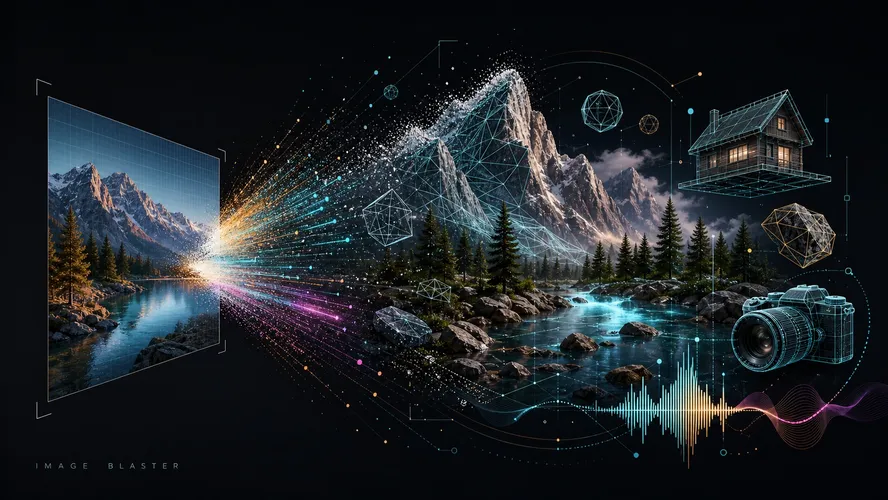
Image Blaster removes that block. It’s a Claude Code skill. Feed it one image, get back a complete 3D world — object models, static environment, environment audio. All driven conversationally inside the Claude terminal, in under 5 minutes.
What Image Blaster Does
Image Blaster chains three AI generation pipelines. It reads an image, decomposes it, and rebuilds it:
- World Labs Marble model generates an explorable 3D environment as a Gaussian splat (spz format), handling the static background
- Hunyuan 3D via FAL extracts dynamic objects from the image and produces textured 3D models (glb, obj formats)
- ElevenLabs SFX model generates ambient audio and object interaction sounds (mp3 format)
The pipeline in one line: image -> spatial reconstruction + object extraction + audio matching -> a full asset pack ready for any engine.
Tool Architecture: 8 Skills + 5 External Services
Image Blaster isn’t a single skill — it’s a pipeline of 8 Claude Code skills, each responsible for one stage. They’re wired together through .claude/settings.json with permissions, hooks, and script commands.
Internal Skills:
| Skill | Responsibility |
|---|---|
| image-blast-project | Project orchestration. Creates world directory structure, generates project.json, tracks pipeline state |
| image-blast-uncover | Image analysis core. Reads images, identifies separable dynamic objects, generates scene descriptions |
| image-blast-plate | Clean plate generation. Removes confirmed objects from source images, leaving a clean background |
| image-blast-world | Calls World Labs API to generate the 3D static environment (Gaussian splat) |
| image-blast-3d | Generates 3D models for each dynamic object. Supports Hunyuan (default) and Meshy providers |
| image-blast-sfx | Generates three audio types: ambient loops, object impact sounds, custom prompt-based SFX |
| image-blast-image-edit | Generic image editing skill. Supports plate generation, object reference cropping, and arbitrary edits |
| image-blast-wildcard | Wildcard escape hatch. Use any FAL model the user requests (extra image gen, etc.) |
External AI Services:
| Service | Model | Purpose |
|---|---|---|
| World Labs | marble-1.1 | Single-image to explorable 3D Gaussian splat environment |
| FAL AI | hunyuan-3d | Object extraction and textured PBR 3D model generation (glb/obj) |
| FAL AI | nano-banana | Default image editing model for object removal, background inpainting, reference cropping |
| FAL AI | gpt-image-2 | Optional image editing provider, user-selectable |
| ElevenLabs | elevenlabs-sfx | Ambient environment audio and object impact sound effect generation |
The hooks system handles automation: a SessionStart hook runs setup-check.sh to verify dependencies and environment variables. A UserPromptSubmit hook monitors the input/ directory for new files.
How the 8 Skills Work Together
Image Blaster’s execution is a strict sequential pipeline. Each skill’s output feeds the next.
1. image-blast-project (Initialization)
On receiving the blast command, this creates worlds/<task-name>/, generates the initial project.json, and stages source images from input/ to source/. Every downstream skill depends on this being done first.
Script: .claude/scripts/project/project-state.mjs
2. image-blast-uncover (Image Analysis)
The understanding step. Claude reads each source image with its vision capability and extracts:
- Scene name and summary description
- Environment, visual style, lighting, atmosphere, ambient sound
- All separable dynamic objects (test: could a human lift it?) — wall graffiti stays, floor rug stays, but the cup on the table and vending machine on the corner come out
Results go into worlds/<task>/source/<image-name>.json, merged into image.json. Then it pauses: which objects should become 3D models? User confirms.
3. image-blast-plate (Background Cleanup)
After confirmation, calls FAL’s nano-banana (or gpt-image-2) to erase confirmed objects from the source image. The output is a clean plate with only the static environment — what the world skill will reconstruct in 3D.
4. image-blast-world (Environment Generation)
Uses the clean plate plus a refined scene description (with objects subtracted) to call World Labs Marble API. Output: an spz Gaussian splat explorable environment + collider glb + panorama.
5. image-blast-3d (Object Modeling)
For each confirmed object: crop a clean reference image via image edit, then call Hunyuan 3D (or Meshy) to generate a textured 3D model. Controllable parameters include face count, PBR, and geometry type.
6. image-blast-sfx (Sound Generation)
Final step. Generates ambient environment loops from scene description and object impact sounds from object materials via ElevenLabs SFX API. Automatic silence trimming and loudness normalization applied to non-loop outputs.
7. image-blast-image-edit / image-blast-wildcard (Support/Escape)
image-blast-image-edit is the low-level image editing skill called internally by plate, 3d, and other skills. image-blast-wildcard is a generic FAL API passthrough for anything that doesn’t fit (e.g., generating additional concept art).
When to Use It
Image Blaster isn’t a production 3D pipeline. It’s built for concept validation and rapid prototyping.
- Game level concepts: Sketch a scene, blast it, get a first-pass 3D layout you can walk through. Drag it straight into Unity, Unreal, or Godot
- Architecture visualization drafts: Render an architectural view, blast it into a rotatable 3D space for an early client demo
- Film location scouting: Snap a real-world photo, convert it to a 3D environment for shot planning
- Robot simulation environments: Need a test environment fast? Use a reference image, generate it
Generated assets embed into any game engine (Unity, Unreal, Godot), DCC software (Blender, Maya, 3DS Max), or web application (Three.js, Electron). Output formats are industry-standard glb, obj, spz, and mp3 — no intermediate conversion needed.
Where It Falls Short
Image Blaster is fast. Speed comes with trade-offs.
- Not a production-quality pipeline: Assets are concept-grade. Face counts, texture resolution, and UV quality won’t hold up for final products. You’ll refine them in Blender or Maya afterward
- Scene complexity is bounded: A single image limits extractable information. Occluded objects, out-of-frame space, complex transparent materials — the model guesses, it doesn’t compute
- Depends on third-party APIs: You need API keys for both World Labs and FAL. Either service going down or rate-limiting breaks the pipeline
- Default face counts are conservative: Hunyuan 3D defaults to 50000 faces, configurable up to 1.5 million. Higher counts mean longer generation and higher API costs
- Not for multi-image reconstruction: Image Blaster handles one image. If you need an accurate scan of a full building or large environment, photogrammetry or NeRF is the right tool
Setup
Prerequisite: Claude Code CLI installed.
# 1. Clone the repo
git clone https://github.com/neilsonnn/image-blaster
cd image-blaster

# 2. Install Claude Code if you haven't already
curl -fsSL https://claude.ai/install.sh | bash

# 3. Start Claude
claude
Once inside the Claude terminal, give it your World Labs and FAL API keys. Claude will configure them into the project automatically.
Get your API keys:
- World Labs: https://platform.worldlabs.ai/
- FAL: https://fal.ai/
The project includes an .env.example file as a configuration reference. Claude follows that template to set up your environment variables.
Usage
Drop an image into the input/ directory, then tell Claude:
blast it and confirm each step with meClaude runs all 8 skills in sequence:
- project skill creates the project folder, initializes state
- uncover skill analyzes the image, extracts object list, waits for confirmation
- plate skill erases objects, generates clean plate
- world skill calls World Labs to generate the Gaussian splat scene
- After confirmation: 3d skill generates models one by one
- sfx skill generates ambient audio and object SFX
- Pauses after each step for your confirmation
Generated assets land in the worlds/ directory, organized by task in subdirectories.
Controlling Hunyuan 3D Parameters
To adjust model fidelity and style, tell Claude to modify Hunyuan parameters during your session:
| Parameter | Range | Description |
|---|---|---|
| face-count | 40000 ~ 1500000 | Target face count, defaults to 50000 |
| enable-pbr | true / false | Generate PBR materials, defaults to true |
| generate-type | Normal / LowPoly / Geometry | Normal = textured, LowPoly = reduced polygons, Geometry = white untextured |
| polygon-type | triangle / quadrilateral | Polygon type for LowPoly mode, defaults to triangle |
Just append to your blast command: “bump the car model to 200k faces with PBR enabled.”
Practical Example
You have a cyberpunk alley concept image: cyberpunk-alley.png. Drop it into input/, then start Claude:
> blast cyberpunk-alley.png and confirm each step

>> image-blast-project: Creating project worlds/cyberpunk-alley/
  - Staging source to source/0-cyberpunk-alley.png
  - Generating project.json and scene.json skeleton

>> image-blast-uncover: Analyzing image
  - Detected 3 dynamic objects: neon-sign, vending-machine, hover-bike
  - Scene: narrow alley, wet asphalt, neon blue-purple light, distant city hum
  - Waiting for confirmation... (user confirms all 3 objects)

>> image-blast-plate: Generating clean plate
  - Calling nano-banana to erase 3 objects
  - Output: source/1-cyberpunk-alley-plate.png

>> image-blast-world: Generating 3D environment
  - Calling World Labs Marble
  - Output: worlds/cyberpunk-alley/output/world/environment.spz

>> image-blast-3d (neon-sign):
  - Cropping reference -> calling Hunyuan 3D
  - Output: neon-sign.glb (50000 faces, PBR)

>> image-blast-3d (vending-machine):
  - Cropping reference -> calling Hunyuan 3D
  - Output: vending-machine.glb (50000 faces, PBR)

>> image-blast-3d (hover-bike):
  - Cropping reference -> calling Hunyuan 3D (user set 100000 faces)
  - Output: hover-bike.glb (100000 faces, PBR)

>> image-blast-sfx:
  - Ambient: worlds/cyberpunk-alley/output/sfx/city-hum.mp3
  - Object SFX: neon-buzz.mp3, machine-hum.mp3, bike-hover.mp3
  - Post-process: silence trimming, loudness normalization

All assets generated. Ready for import.
Claude pauses for your confirmation between every skill. Want to skip an object, adjust face count, or switch providers? Say so before confirming.
Drag the results into Unity or Blender and start refining.
The Bottom Line
Image Blaster collapses the image-to-3D gap — a step that used to require multiple disciplines — into a single terminal command. It doesn’t replace 3D artists. It replaces the blank-slate phase: the part where you have nothing, and you need something to start working with.
Next time you have a reference image, don’t open Blender first. Blast it.