DESIGN.md: Pure-Text Design Systems That Let AI Agents Generate Pixel-Matched UI
- Smars
- Agent Skills , AI Design
- 16 May, 2026
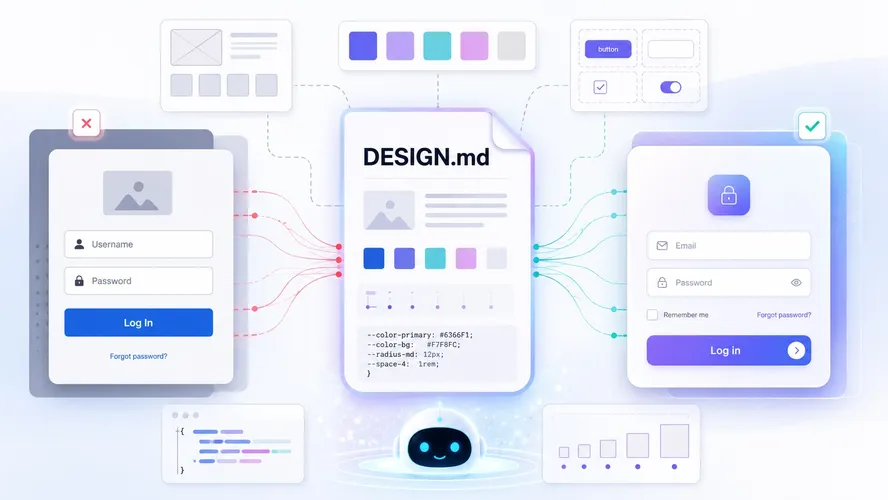
You tell your AI agent “build a login page” and it spits out a blue-button Bootstrap default. You ask it to add a modal to your existing project and the buttons are three shades off your design spec. The agent isn’t dumb — it just doesn’t know what your project is supposed to look like.
Figma exports, CSS variable JSON files, Storybook component libraries… the standard ways of stuffing design context into an agent’s prompt are either slow, expensive, or just don’t register. The Google Stitch team proposed something simpler: DESIGN.md.
What DESIGN.md Is
DESIGN.md is a plain-text design system document. No JSON schema. No Figma plugin. No special tooling. Just a markdown file. Drop it in your project root and any AI coding agent or Google Stitch instantly understands how your UI should look.
| File | Who reads it | What it defines |
|---|---|---|
| AGENTS.md | Coding agents | How to build the project |
| DESIGN.md | Design agents | How the project should look and feel |
Markdown is the format LLMs read best — nothing to parse, nothing to configure. Copy, paste, done. The agent just gets it.
awesome-design-md is the public resource library for this format: 73 DESIGN.md files extracted from real websites, covering Claude, Stripe, Vercel, Notion, Figma, Apple, Nike, SpaceX, and more. 79.6k stars, 9.6k forks on GitHub.
What’s Inside Each DESIGN.md
Every file follows the Google Stitch DESIGN.md format with 9 sections:
| # | Section | What it captures |
|---|---|---|
| 1 | Visual Theme & Atmosphere | Mood, density, design philosophy |
| 2 | Color Palette & Roles | Semantic name + hex + functional role |
| 3 | Typography Rules | Font families, full hierarchy table |
| 4 | Component Stylings | Buttons, cards, inputs, navigation with states |
| 5 | Layout Principles | Spacing scale, grid, whitespace philosophy |
| 6 | Depth & Elevation | Shadow system, surface hierarchy |
| 7 | Do’s and Don’ts | Design guardrails and anti-patterns |
| 8 | Responsive Behavior | Breakpoints, touch targets, collapsing strategy |
| 9 | Agent Prompt Guide | Quick color reference, ready-to-use prompts |
Each brand also comes with two visual preview files: preview.html (light) and preview-dark.html (dark). They render the actual color swatches, type scale, buttons, and cards so you know what the agent will generate.
This isn’t a Figma replacement. It’s something agents can actually read. LLMs don’t open Figma files. They read markdown, line by line.
When to Use It
DESIGN.md solves a very specific problem: AI agent-generated UI that doesn’t match your brand.
- Vibe coding prototypes: Tell the agent “build a dashboard in the style of DESIGN.md” and get something that looks intentional, not like a default component library
- Multi-agent workflows: Different agents writing code in the same project stay visually consistent
- Cold-starting a new project: Pick a brand style from awesome-design-md (say, Stripe’s signature purple gradients or Linear’s ultra-minimal purple accent), copy the DESIGN.md, and your agent generates UI in that style from day one
- Team alignment: Developers don’t need to memorize hex codes, font sizes, or border radii — the agent handles it
What It’s Not Good At
DESIGN.md is a design reference for agents, not a complete design spec for humans.
- Doesn’t replace Figma: It doesn’t capture complex interaction states like multi-step animations or gesture feedback. It covers static visual rules.
- Edge cases fall through: Nine sections cover common components well. Heavily custom interfaces still need manual calibration.
- Complex brands degrade quality: Clean, modern brands (Stripe, Vercel, Linear) translate well. Brands with dense, illustration-heavy visual languages confuse agents more.
- Dependent on agent design capability: The underlying LLM’s grasp of CSS and visual presentation directly determines output quality. Claude Code, Gemini CLI, Cursor — results vary across agents.
If your project already has a mature design system and component library, DESIGN.md won’t move the needle much. If you’re building new interfaces with AI agents, prototyping, or operating without a dedicated designer, this saves you an entire day.
How to Use It
awesome-design-md is a GitHub repository. No installation required. Browse and pick.
- Browse getdesign.md or the design-md/ directory in the GitHub repo
- Find the brand style you want, copy its DESIGN.md
- Drop the file into your project root
- Tell your AI agent: “Generate UI using the DESIGN.md in this project”
Quick start from the repo:
# Clone the repository
git clone https://github.com/VoltAgent/awesome-design-md.git

# Copy the DESIGN.md you want into your project
cp awesome-design-md/design-md/stripe/DESIGN.md ./DESIGN.md
Practical Example
Say you want an AI agent to build a SaaS admin dashboard. You pick Linear’s minimalist aesthetic.
Copy Linear’s DESIGN.md into your project root, then tell the agent:
“Using the DESIGN.md in this project, generate a project dashboard. Include a sidebar navigation, a top status bar, and a main area with cards for project progress, team members, and a task list.”
The agent reads DESIGN.md and applies Linear’s visual rules automatically: Inter Display font, purple accent (#5E6AD2), strict 4px spacing system, zero border radius, dark background with semi-transparent cards…
Without DESIGN.md, the agent defaults to whatever generic style it was trained on. The result might look nothing like what you wanted. With DESIGN.md, you land close to the target on the first pass.
/* Agent-generated button from DESIGN.md rules */
.btn-primary {
  background: var(--color-accent, #5e6ad2);
  color: #fff;
  border-radius: 0;
  font-family: "Inter Display", sans-serif;
  font-size: 13px;
  font-weight: 500;
  padding: 6px 12px;
  letter-spacing: -0.05em;
}
Writing Your Own DESIGN.md
The files in awesome-design-md are extracted from other people’s sites. To write one for your own project, follow the Google Stitch format.
A minimal, usable DESIGN.md:
# Project Design System

## Visual Theme & Atmosphere

Clean, minimal, developer-first. High contrast, generous whitespace.

## Color Palette & Roles

| Name         | Hex     | Role                               |
| ------------ | ------- | ---------------------------------- |
| Primary      | #3B82F6 | CTAs, links, active states         |
| Surface      | #FFFFFF | Cards, modals, elevated containers |
| Background   | #F8FAFC | Page background                    |
| Text Primary | #0F172A | Body copy, headings                |

## Typography Rules

| Level   | Family | Size        | Weight |
| ------- | ------ | ----------- | ------ |
| Display | Inter  | 48px / 1.1  | 700    |
| H1      | Inter  | 32px / 1.25 | 600    |
| H2      | Inter  | 24px / 1.3  | 600    |
| Body    | Inter  | 16px / 1.6  | 400    |
| Caption | Inter  | 13px / 1.5  | 400    |

## Layout Principles

Spacing scale: 4px system (4, 8, 12, 16, 24, 32, 48, 64)
Max content width: 1200px
Grid: 12-column, 24px gutter
Save this as DESIGN.md and any agent reading it has enough to generate a coherent baseline UI.
The Bottom Line
DESIGN.md isn’t a design tool revolution. It’s an engineering convention for the agent era. It collapses “how do I tell the AI what the UI should look like” into a markdown file anyone can edit.
Next time you tell your agent “make it look good” and get default-styled slop in return, consider: the problem isn’t the agent. It’s that the agent didn’t have a DESIGN.md.
GitHub: https://github.com/VoltAgent/awesome-design-md | Website: https://getdesign.md | Google Stitch: https://stitch.withgoogle.com/docs/design-md/overview/