22 Claude Code Skills for End-to-End Content Creation: From Generation to Publish in One Workflow
- Smars
- Agent Skills , AI Efficiency
- 09 May, 2026
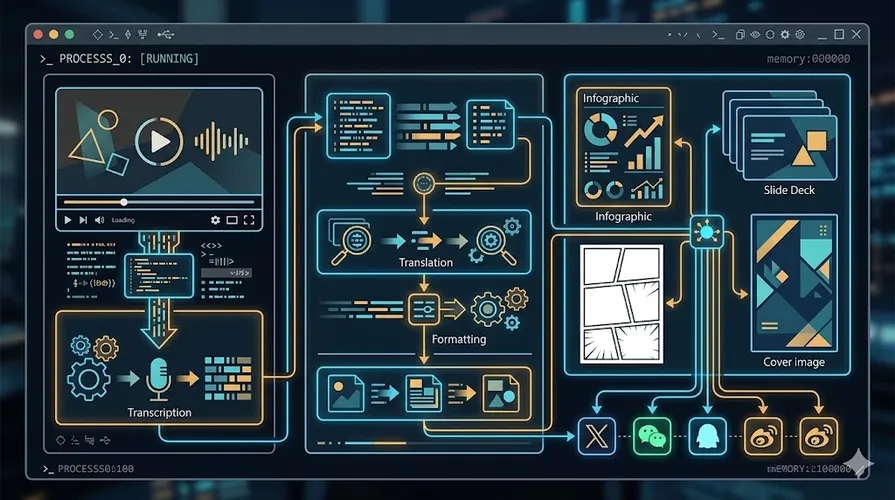
You finish a technical blog post. Now comes the headache: generate a cover image, create illustrations, make an infographic, convert to HTML for WeChat, publish to X and Weibo. These tasks used to require switching between four or five tools. Now you can do it all inside Claude Code with a single slash command.
Baoyu’s baoyu-skills is the most popular content creation skill set on the Claude Code marketplace. 14K+ stars on GitHub, 285K+ installs. It packages the entire content creation pipeline into 22 combinable skills, covering image generation, visual design, document conversion, and multi-platform publishing.
Not Plugins, a Production Line
Many people treat Claude Code as a coding assistant, but baoyu-skills proves its scope goes far beyond that. The whole suite is organized in three layers:
- Content generation — covers, illustrations, infographics, slides, comics, each an independent production line
- Backend engine — image generation supporting 10+ providers, from OpenAI to Alibaba, Seedream, and Jimeng
- Tool chain — YouTube transcripts, URL to Markdown, translation, image compression, formatting
These three layers package a content creator’s entire daily workflow into Claude Code. You do not need to remember where each tool lives, do not need to switch tabs. Just type a / command in the terminal.
Image Generation: More Than “One Picture”
baoyu-imagine is the image engine for the whole suite. The provider list alone is staggering:
- OpenAI GPT Image 2
- Google Gemini
- Azure OpenAI
- OpenRouter
- DashScope (Alibaba Tongyi Wanxiang)
- Z.AI GLM-Image
- MiniMax
- Jimeng
- Seedream (Doubao)
- Replicate
The key is not the number of providers. It is that one command switches between them. The system auto-detects which API keys you have configured and picks the right provider by priority. If you have no image generation API keys at all, baoyu-danger-gemini-web can connect to Gemini Web via browser cookies for free generation.
/baoyu-imagine --prompt "tech poster" --image poster.png --provider dashscope --ar 16:9Batch mode and concurrency controls are also included, perfect for generating multiple images at once.
Visual Design: The Explosion of Style x Layout Combinations
This is where baoyu-skills shines brightest. Not just generating “one picture,” but using a systematic style engine to produce a full set of visual assets.
baoyu-xhs-images (Xiaohongshu cards): 12 styles x 6 layouts, from cute to notion, from sparse to dense, with optional macaron palette override. One article auto-splits into 1-10 cards.
baoyu-infographic: 21 information layouts x 17 visual styles, including pyramid, funnel, fishbone, Venn, iceberg, and more. Styles range from hand-drawn illustration, claymation, Corporate Memphis to cyberpunk neon.
baoyu-diagram SVG charts: Claude writes SVG code directly, no image model involved. Supports auto light/dark mode switching. Flowcharts, sequence diagrams, architecture diagrams, intuition diagrams all self-contained.
baoyu-comic (knowledge comics): 5 art styles x 7 tones x 6 panel layouts. Supports Ohmsha preset, wuxia style, and shoujo manga special rules.
baoyu-slide-deck: Generate full slide decks from articles, supporting 15+ preset styles, auto-merging into .pptx and .pdf.
baoyu-cover-image: Five-dimensional customization system: type x palette x rendering x text x mood. 11 palettes x 7 renderings = 77 combinations.
What these skills share is that you do not write prompts yourself. Feed in content, the skill analyzes the article structure, recommends suitable style and layout combinations, then generates after confirmation. You only need to say yes or no.
Multi-Platform Publishing: Write Once, Publish Everywhere
The publishing phase after content creation is also packaged:
- baoyu-post-to-wechat: Supports image-post mode and article mode, API or browser two ways. Supports multi-account management.
- baoyu-post-to-x: Supports regular posts, X Articles, and image posts. Uses Chrome CDP to bypass anti-automation.
- baoyu-post-to-weibo: Supports regular posts, images/videos, and headline articles.
These publishing skills are semi-automatic: scripts fill content into the browser, you check and hit publish. This is an intentional safety mechanism, not a bug. If you need fully automatic publishing, you need to wire up the API layer yourself.
Tool Chain: From Raw Material to Publishable Content
The pipeline starts with raw material collection and ends with format conversion. Utility skills cover both ends:
- baoyu-youtube-transcript: Download YouTube subtitles, supporting multilingual, translation, chapter segmentation, and speaker identification
- baoyu-url-to-markdown: Scrape any URL to Markdown, good for pages requiring login
- baoyu-danger-x-to-markdown: Convert X/Twitter threads or articles to Markdown
- baoyu-translate: Three translation modes: quick (direct), normal (analysis-informed), refined (full publication-quality workflow with review and polish)
- baoyu-format-markdown: Auto-add frontmatter, heading hierarchy, bold, lists, code blocks, and CJK typography
- baoyu-markdown-to-html: Convert to WeChat Official Account compatible HTML with multiple themes and colors
- baoyu-compress-image: Compress images to reduce file size
These tools automate every step from raw material to publishable content. You can grab a foreign article with /baoyu-url-to-markdown, translate it with /translate, format it with /baoyu-format-markdown, generate a cover with /baoyu-cover-image, and publish to WeChat with /baoyu-post-to-wechat. All without leaving the terminal.
Installation and Configuration
Installation is simple, pick one of three methods:
# Method 1: Quick install
npx skills add jimliu/baoyu-skills

# Method 2: Register as plugin marketplace
/plugin marketplace add JimLiu/baoyu-skills

# Method 3: Just tell Claude
Please install skills from github.com/JimLiu/baoyu-skills
Configure API keys with .env files, supporting both project-level and user-level:
# User-level config
mkdir -p ~/.baoyu-skills
cat > ~/.baoyu-skills/.env << 'EOF'
OPENAI_API_KEY=***
GOOGLE_API_KEY=***
DASHSCOPE_API_KEY=***
EOF

# Project-level config (team shared)
mkdir -p .baoyu-skills
echo ".baoyu-skills/.env" >> .gitignore
Load priority: command-line env > system env > project .env > user .env. This means you can configure common variables in a team project, and override some settings in personal projects.
Custom Extensions
Every skill supports customization via EXTEND.md. For example, adding brand colors to baoyu-cover-image:
mkdir -p .baoyu-skills/baoyu-cover-imageCreate .baoyu-skills/baoyu-cover-image/EXTEND.md:
## Custom Palette

### corporate-tech

- Primary: #1a73e8, #4A90D9
- Background: #F5F7FA
- For: SaaS, enterprise, technical content
Extension content loads before skill execution, overriding defaults. This design lets personal preferences coexist with team standards.
Pitfalls and Boundaries
This skill set is not a panacea. A few things to watch:
Publishing skills are semi-automatic. X, WeChat, and Weibo publishing all require opening a browser, scripts fill content, then you manually hit publish. This is an intentional safety mechanism, not a bug. If you need fully automatic publishing, you need to wire up the API layer yourself.
Two danger skills carry risks. baoyu-danger-gemini-web and baoyu-danger-x-to-markdown are reverse engineering projects relying on browser cookies. They may break without warning when the other side updates their API, and there is account risk. Do not treat them as core dependencies in production environments.
Image generation needs API keys configured. If you have no image generation API keys, you can only use baoyu-danger-gemini-web or configure keys first. Do not expect to generate high-quality images immediately after installation.
Style selection needs experimentation. Auto-recommended style combinations are not always spot-on. Sometimes manual specification is needed. Especially for brand colors and personal preferences, define your own presets via EXTEND.md.
Not suitable for: If you only publish occasionally, the learning cost of installing this large suite may not be worth it. It is for creators or teams producing at least 3-5 pieces of content per week.
Quick Start: From One Article to Full Visual Content
Here is a typical workflow showing how to go from raw material to published content using this skill set:
Step 1: Collect raw material
In Claude Code:
/baoyu-youtube-transcript https://www.youtube.com/watch?v=VIDEO_ID --languages zh,en
/baoyu-url-to-markdown https://example.com/article -o source.md
Step 2: Translate and format
/translate source.md --to zh-CN --mode refined --audience technical
/baoyu-format-markdown source-translated.md
Step 3: Generate visual assets
/baoyu-cover-image source-translated.md --type conceptual --palette cool
/baoyu-article-illustrator source-translated.md --type infographic --style notion
/baoyu-infographic source-translated.md --layout pyramid --style craft-handmade
Step 4: Convert to WeChat format
/baoyu-markdown-to-html source-translated.md --theme grace --color blueStep 5: Publish
/baoyu-post-to-wechat article --markdown source-translated.md --theme grace
/baoyu-post-to-x --article source-translated.md
All done in one terminal. No tab switching, no copy-paste, no format adjustments.
Closing
The future of content creation is not more tools, but fewer context switches. The value of baoyu-skills is not in how powerful any single skill is, but in that they form a complete production line.
From YouTube transcript to translation, from formatting to cover images and infographics, from HTML conversion to multi-platform publishing, every step is one command in Claude Code. This “never leave the terminal” workflow is what content creation should look like in the agent era.
Your next article does not need tab switching.
Sources:
- GitHub: https://github.com/JimLiu/baoyu-skills
- Claude Code Marketplace: https://claudemarketplaces.com/skills/jimliu
- English docs: https://github.com/JimLiu/baoyu-skills/blob/main/README.md