AI Agent Skill: Caveman Mode Cuts 75% Output Tokens Without Losing Accuracy
- Smars
- Agent Skills , AI Efficiency
- 07 May, 2026
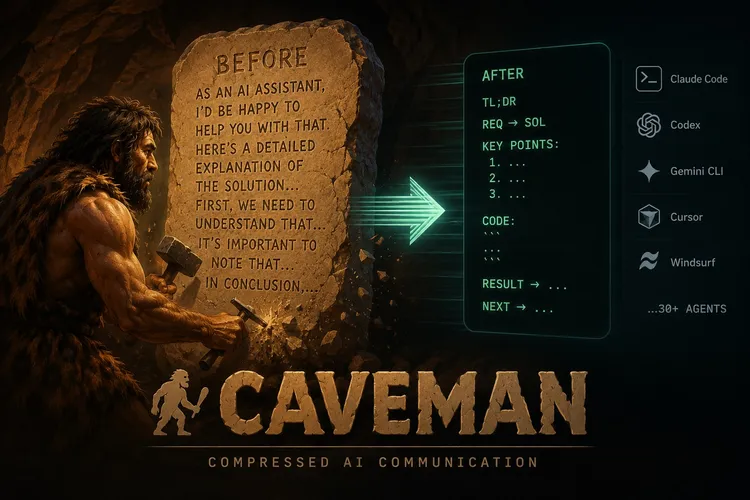
Your AI agent talks too much. Every “Sure! I’d be happy to help you with that” is a wasted token that costs you money, slows down response, and buries the actual answer in a wall of preamble. If you’re using AI coding agents daily — Claude Code, Cursor, Codex, or any LLM-powered agent — verbosity isn’t a personality quirk. It’s a performance tax on every single interaction. The default AI communication style — polite, thorough, and verbose — was designed for chat interfaces, not for agent-driven coding workflows where brevity is the difference between a usable tool and a frustrating one.
This is where the Caveman AI skill comes in. It’s an agent skill that rewrites how your AI coding assistant talks, cutting output tokens by 65-87% while keeping every byte of technical accuracy intact.
By the Numbers
Caveman is a Claude Code skill (also works with Codex, Gemini CLI, Cursor, Windsurf, and 30+ other agents) that rewrites the agent’s communication style into compressed, telegraphic speech. It removes filler words, drops polite preamble, and strips articles and unnecessary grammar — while preserving every byte of technical accuracy.
The numbers are not subtle:
| Metric | Improvement |
|---|---|
| Output token reduction | 65% average (range 22–87%) |
| Response speed | ~3x faster |
| Technical accuracy | 100% preserved |
| Readability | Significantly improved |
Benchmarks from real Claude API calls tell the story. Explaining a React re-render bug goes from 1,180 tokens to 159 (87% savings). Debugging a PostgreSQL race condition drops from 1,200 to 232 (81%). Implementing a React error boundary collapses from 3,454 to 456 (87%). Across ten diverse coding tasks, the average went from 1,214 tokens to 294.
A March 2026 paper from Arxiv (“Brevity Constraints Reverse Performance Hierarchies in Language Models”) found that constraining large AI models to brief responses actually improved accuracy by 26 percentage points on certain benchmarks. Verbose ≠ better. For AI agent skills, this means optimizing output token usage isn’t just about cost — it can improve agent performance.
When to Use It
Caveman fits best in high-throughput AI coding workflows where you’re iterating fast and the agent’s role is to give you answers, not hold your hand. As an AI agent skill, its value scales with usage volume.
- Code review: One-line findings replace paragraphs of explanation.
L42: null guard missinginstead of “I noticed that on line 42, there’s a potential null pointer exception…” - Debugging sessions: Rapid fire diagnose-and-fix cycles where every second of response latency compounds
- Commit message generation: Conventional Commits with ≤50 char subjects, focused on why not what
- Long agent sessions: Less output tokens per exchange means the context window stays usable longer
It’s also excellent for teams working in shared agent contexts (like Claude Code’s project mode) where the accumulated verbosity of multiple exchanges eats into the available context budget.
What It’s Not Good At
Caveman is not for every interaction. Here’s where it falls short:
- Explaining concepts to newcomers: If your audience needs the hand-holding, caveman comes across as rude or cryptic
- Writing customer-facing documentation: The documentation itself should be clear and well-structured, not compressed
- Tasks requiring nuanced diplomatic language: Code review for junior developers, for example — sometimes the preamble is the point
- Very short answers: If the normal response is already under 50 tokens, compression gains are negligible
The skill is also output-only — it doesn’t touch reasoning tokens (thinking/CoT traces), so the model’s internal processing quality is unaffected. If your bottleneck is API cost, caveman helps. If your bottleneck is model reasoning depth, this isn’t the lever.
Installing Caveman
One-line install that auto-detects 30+ agents:
curl -fsSL https://raw.githubusercontent.com/JuliusBrussee/caveman/main/install.sh | bashFlags control the scope:
| Flag | What it does |
|---|---|
| —minimal | Plugin only, no extras |
| —all | Full install with hooks, statusline, MCP, repo rules |
| —only | Install for a specific agent only |
Manual install for specific agents:
# Claude Code
claude plugin marketplace add JuliusBrussee/caveman && claude plugin install caveman@caveman

# Cursor / Windsurf / Cline / Copilot
npx skills add JuliusBrussee/caveman -a cursor
Usage
Trigger caveman mode in any session:
/caveman          # default full mode
/caveman lite     # drop filler, keep grammar
/caveman ultra    # maximum compression
Switch to classical Chinese for even denser output:
/caveman wenyan           # full 文言文
/caveman wenyan-lite      # semi-classical
/caveman wenyan-ultra     # extreme compression
Stop with: “stop caveman” or “normal mode”.
The skill also ships companion agent commands:
| Command | Purpose |
|---|---|
| /caveman-commit | Generate terse Conventional Commits |
| /caveman-review | One-line PR review comments |
| /caveman-compress | Compress CLAUDE.md and memory files (~46% reduction) |
| /caveman-stats | Real session token savings with lifetime aggregation |
Practical Example
Before caveman. A Claude Code session explaining a race condition:
“The issue you’re experiencing is related to a race condition in your database connection pool. When multiple concurrent requests try to acquire connections from the pool simultaneously, the pool can exhaust its available connections if the release logic doesn’t complete fast enough. I’d recommend implementing a retry mechanism with exponential backoff…”
Caveman version:
“Race condition in connection pool. Concurrent acquires exhaust pool before release completes. Fix: retry + exponential backoff.”
Same diagnosis. Same fix. 75% fewer tokens.
Run curl -fsSL https://raw.githubusercontent.com/JuliusBrussee/caveman/main/install.sh | bash and see how many tokens your next session burns on empty pleasantries. The question is: can you afford the verbose version?
Verbose agents are polite. Caveman agents are useful. Pick one.
GitHub: https://github.com/JuliusBrussee/caveman | npm: npx caveman-shrink