Feishu CLI Drops 100+ New Capabilities: Your Agent Now Works Like a Human
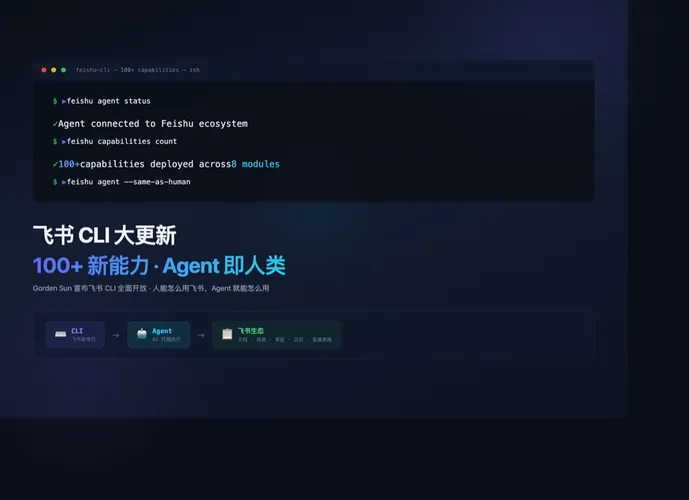
On May 12, 2026, Gorden Sun dropped a bomb on X: Feishu CLI gained over a hundred new capabilities and opened up the entire Feishu ecosystem to command-line access. The real punchline — agents can now do everything a human can do in Feishu. Within hours, the post had accumulated tens of thousands of views and hundreds of engagements, but the numbers tell only part of the story. What matters is what they point to: when a collaboration platform with two hundred million users chooses the CLI as its primary interface for AI agents, the interaction logic of enterprise software shifts at a foundational level.
From API to CLI: a much shorter path
Before this update, wiring an agent into Feishu meant running the full API gauntlet. Register an app on the developer portal, fill out forms, wait for approval. Negotiate OAuth 2.0 scopes, manage access tokens and refresh tokens by hand. Set up webhooks, deploy a publicly reachable event listener, maintain valid TLS certificates, verify signatures on every incoming payload. And after all that, the agent’s reach still fell short of what a human could do in the desktop client. Some endpoints simply did not exist. Others were marked “coming soon” for quarters on end. Many routine operations required chaining multiple API calls just to accomplish a single task. This is not unique to Feishu — it is the shared limitation of every platform that uses API as the agent interface. APIs were designed for developers, not for agents. The abstraction layers are off by an order of magnitude.
The CLI breaks through this bottleneck by lowering the barrier to entry. A CLI is, by design, a human-friendly interaction surface: commands are semantic, operations are atomic, output is structured. The cost for an agent to call a CLI command is dramatically lower than calling an API. The agent does not need to understand the Feishu resource model, handle OAuth edge cases, or write adapter code for every endpoint. It only needs to know the command syntax. The CLI handles authentication, retry logic, error parsing, and pagination transparently. What used to take a week of integration work can now be done in an afternoon.
Keys don’t discriminate
The deepest change in this update is not a technical one — it is a permission model shift. Previously, an agent’s Feishu permissions and a human’s Feishu permissions lived in two separate systems. Agents went through the API and received application-level permissions bounded by scope definitions, IP whitelists, and rate limits. Humans went through the client and received organization-level permissions bounded by department, role, and security clearance. The two systems were inherently unequal. Agents were always second-class citizens.
The CLI changes this calculus. It runs in the user’s context and carries the user’s credentials. Every command an agent issues through the CLI is bound to a specific human identity — it sends messages under that person’s name, creates documents with their permission level, triggers approval flows through their approval chain. The key does not care who holds it. It only cares whose key it is. This sounds simple but represents a deep architectural decision: the platform is no longer treating agents as third-party applications. It is treating them as extensions of human users. The agent is the person sitting at the desk, just without a mouse.
The modular layout of one hundred capabilities
One hundred new capabilities is not a marketing number. Look at what they cover and you can map the full Feishu product surface. Messaging and groups form the first layer — the highest-frequency interaction surface. Send messages, create groups, invite members, search chat history, manage announcements. Everything you can do in a chat window, the CLI can do. Documents and knowledge bases form the second layer — the foundation of enterprise knowledge management. Create docs, edit content, set permissions, search knowledge spaces, manage versions. Operations that used to require opening a browser now complete with a single command. Calendars and scheduling form the third layer — the hub of time management. Check availability, create meetings, invite participants, manage recurring events. An agent can handle all meeting logistics without human intervention. Approvals and workflows form the fourth layer — the critical path of enterprise collaboration. Initiate approvals, check status, escalate, batch-process pending items. The agent replaces the human who spends half their day chasing pending approvals. Spreadsheets, video conferencing, email, and contacts round out the picture. Every core module of Feishu is now CLI-addressable. These eight layers constitute the full product surface and, by extension, the full agent capability surface.
What a cross-module workflow looks like in practice
Assemble all these capabilities and you get a workflow that was impossible before. The agent starts by reading the weekly product requirements document from Feishu Docs. It extracts key tasks and deadlines through natural language understanding. Then it creates corresponding task records in a spreadsheet, assigning owners and priorities. Next it checks participants’ calendar availability, automatically schedules a review meeting, and sends calendar invitations through Feishu messaging. After the meeting, the agent reads the transcript, extracts action items, submits change requests through the approval flow, writes the complete results back to the original document, and broadcasts a summary to the project group. The entire chain runs from start to finish without a single human touchpoint. From a traditional automation perspective, this is workflow automation. From a work-pattern perspective, this is programmable collaboration — not removing humans from the loop, but making the loop itself something that can be understood and orchestrated by software.
Scenario one: team-level AI assistant
For medium-sized teams using Feishu, the most immediate application is a team-level AI assistant. Previously, you needed a dedicated chatbot application to handle information queries, document searches, and scheduling within a group. Now you need only a CLI script and an agent. You tell Feishu “pull last week’s sales data, summarize it into a table, and send it to the project group.” The agent receives the instruction, calls the CLI to search documents and read spreadsheets, generates a summary, and pushes it to the target group. No extra bot application to develop. No event listener to deploy. No long-running service to maintain. The CLI is the bridge between agent and Feishu. The agent runtime is itself the bot.
Scenario two: ops automation
Feishu often serves as the hub for approval flows and alert notifications inside enterprises. A typical scenario: the monitoring system detects an anomaly in a production service and pushes an alert to a Feishu group. In the old model, an engineer would manually check the alert details, log into the system to investigate, submit a change request through Feishu’s approval flow, execute the fix, and document the results. Now an agent can handle the entire cycle automatically. On receiving the alert, it calls the CLI to search the knowledge base for the relevant SOP. It performs initial diagnosis according to the procedure. If a change is needed, it initiates an approval request through the CLI. Once approved, it executes the change, writes the entire process back to a document, and updates the alert status. The efficiency gain is substantial, but the audit trail matters more — every CLI command is logged, and every action can be traced back to a precise moment and decision.
Scenario three: cross-team information synchronization
The most time-consuming part of enterprise collaboration is often cross-team information sync. Marketing needs product data. Product needs engineering timelines. Engineering needs design resources. Every information gap demands a meeting or a long message thread to close. With the CLI, an agent can serve as a cross-team information pipeline. It reads project timelines from spreadsheets, examines requirements from documents, checks key milestones on the calendar, and automatically generates a cross-team status report that it sends to all stakeholders. The information flow shifts from “person asks, person answers” to “data aggregates itself.” The cycle drops from hours to minutes.
Boundaries, risks, and what to watch for
The CLI opens up new capability frontiers for agents, but those frontiers should not be pushed without guardrails. The first risk is at the permission level. If a key does not care whose hand holds it, the same key does not care who abuses it. An agent with high-level permissions, if vulnerable to prompt injection or command hijacking, leaks not just a single API’s data but the entire capability surface of that user identity. The second risk is at the audit level. Agent operations flow through the CLI, but where the logs live — at the CLI layer or the Feishu server layer — determines whether we can reconstruct who did what through which agent. If the Feishu server only sees CLI calls without the agent’s decision logic, the audit chain is broken halfway. The third risk is at the rollback level. When an agent performs a batch operation at scale and something goes wrong — a hundred messages sent to the wrong group, a hundred document permissions changed incorrectly, a hundred approvals approved in error — does Feishu provide one-click rollback? Currently, CLI commands are atomic, but cross-command transaction rollback requires a higher-level workflow engine to catch the pieces.
Feishu’s CLI update hands the platform keys to agents. But next to those keys, there needs to be a clearly marked warning sign.
When the same key opens every door for both humans and agents, Feishu stops being an office suite and becomes an operating system where both species collaborate — and permission boundaries plus audit trails are the two load-bearing walls that need redesigning first.