OpenSpec: agree with your AI before you write a single line
OpenSpec is a spec-driven development framework for AI coding assistants. It adds a lightweight specification layer so you and your AI agree on requirements, design, and tasks before generating code. The npm package has 45.8k GitHub stars and supports 25+ AI coding tools.
Your AI coding assistant built a feature last week that you’re still debugging this week. The bug isn’t in the AI’s code — it’s in your prompt. You described what you wanted in three chat messages, the AI filled in the gaps with plausible assumptions, and nobody checked whether those assumptions matched reality. The most expensive bug in AI-assisted development is building the wrong thing correctly.
What makes chat-based coding unreliable
Chat-based development treats requirements as conversation history. That works for five-line scripts. It does not work when you’re modifying a payment system, adding multi-tenant auth, or refactoring a data pipeline across three services. The AI has no durable record of what the system should do — it has your last few messages, and those scroll out of context the moment you move on to the next task.
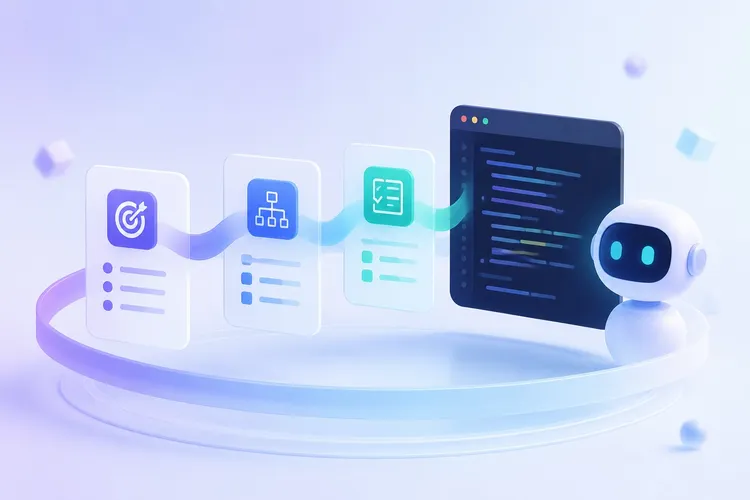
OpenSpec adds a lightweight specification layer: a folder of markdown files where you and your AI agree on the requirements, design, and tasks before generating code. Each change gets its own directory with a proposal (why), delta specs (what’s changing relative to current behavior), a design doc (how), and a checklist (steps). The AI reads these artifacts to understand what you want; you review them to confirm the AI understood. The core workflow is: propose specs, implement via task checklist, archive deltas into the main spec.
The key insight is delta specs. Instead of rewriting the entire spec for every change, you describe what’s added, modified, or removed. Two changes touching the same spec won’t conflict as long as they modify different requirements. When you archive a completed change, the deltas merge into the main specs — your source of truth grows organically, one change at a time.
OpenSpec vs chat-based coding: key differences
| Aspect | Chat-based coding | OpenSpec (spec-driven) |
|---|---|---|
| Requirements storage | Chat history (scrolls out of context) | Persistent markdown files in openspec/ |
| Change tracking | None (start fresh each session) | Delta specs (ADDED/MODIFIED/REMOVED) |
| AI tool support | Session-bound | 25+ tools via slash commands |
| Review before code | No | Yes (proposal + specs reviewed first) |
| Audit trail | Lost on context clear | Archived in changes/archive/ |
| Parallel changes | Not possible | Multiple change folders, no conflicts |
| GitHub stars | — | 45.8k |
| npm downloads | — | Growing, published as @fission-ai/openspec |
When to use OpenSpec (and when not to)
OpenSpec works best for features that span multiple files and involve behavior changes you want to review before shipping. The pattern: explore, agree on specs, implement, archive. It integrates with Cursor, Windsurf, Claude Code, GitHub Copilot, Cline, and other tools via slash commands like /opsx:propose, /opsx:apply, and /opsx:archive.
It does not replace code review, testing, or CI. It does not help if your team’s bottleneck is deployment velocity rather than requirements clarity. For greenfield prototypes where requirements change hourly, artifact overhead will slow you down. Use OpenSpec when the cost of misunderstanding exceeds the cost of documentation.
Most AI coding tools optimize for speed. OpenSpec optimizes for correctness. Projects that need the first are visible. Projects that need the second are the ones that survive.
Installation and quick start
Requires Node.js 20.19.0+. Install globally, initialize in your project:
npm install -g @fission-ai/openspec@latest
cd your-project && openspec init
Start a change by telling your AI assistant:
/opsx:propose add-payment-webhooksThe AI creates openspec/changes/add-payment-webhooks/ with proposal, specs, design, and tasks. Review the artifacts, then:
/opsx:applyThe AI works through the task checklist. Archive when done:
/opsx:archiveDelta specs merge into openspec/specs/, the change moves to openspec/changes/archive/, and your specs now describe the updated system. Periodically run openspec update to refresh AI guidance after upgrading the package.
FAQ
What is OpenSpec? OpenSpec is a spec-driven development (SDD) framework for AI coding assistants. It structures AI-generated code around written specifications — proposals, delta specs, design docs, and task checklists — stored as markdown files in your project.
What tools does OpenSpec work with? It supports 25+ AI coding tools including Cursor, Windsurf, Claude Code, GitHub Copilot, Cline, Codium, and Continue.dev. It is not locked to any single IDE or model.
Do I need to change my workflow to use OpenSpec? The core workflow adds three steps: propose (define intent via /opsx:propose), apply (implement via /opsx:apply), archive (merge specs via /opsx:archive). Existing code review and CI processes remain unchanged.
Is OpenSpec only for new projects (greenfield)? No. OpenSpec is designed for brownfield development — modifying existing codebases. Delta specs describe changes relative to current behavior, which fits modification work better than full-spec rewrites.
How does OpenSpec compare to traditional spec tools? OpenSpec emphasizes fluid iteration over rigid phase gates. There is no mandatory sequence for creating artifacts. It uses markdown files (no Python setup required) and works with the AI tools teams already use.
OpenSpec is not a project management tool. It is a contract between you and your AI — a lightweight way to agree on what to build before the code exists. If you are tired of spotting specification bugs during code review, you already know whether you need this.
GitHub: https://github.com/Fission-AI/OpenSpec License: MIT